Follow the three C’s when writing your prompts.
How you approach writing your prompts dramatically impacts the result.
- Be concise: Keep prompts simple and avoid overly long or complex requests in a single prompt. A prompt that is short and to the point generally requires less processing from AI.
- Be clear: Be precise and avoid contradictory or ambiguous instructions. Vague prompts, like "Make this better," give AI too many possible paths and require it to make assumptions. Instead, give clearer direction with a more specific prompt, like "Revise this text to be more formal and add a call to action."
- Be consistent: Use the same vocabulary for the same concepts throughout your conversation with AI. For example, if you refer to a “spreadsheet” in your initial prompt, continue to say spreadsheet throughout the rest of your conversation. Using words like “matrix” or “tab” interchangeably in the same chat might confuse AI.
Always evaluate the output
It’s important to evaluate the quality of AI output before using or sharing it. AI models can be prone to "hallucinations" — confident but incorrect responses — for several reasons:.
Hallucinations can happen when there were mistakes in the original training data, or when the AI has been asked to solve a never-seen-before problem or to understand real-world knowledge and physical things. On some occasions, the model may prioritize generating a plausible-sounding answer in order to satisfy the user’s prompt, effectively serving as a guess.
Another reason to evaluate AI output is because different AI models are programmed differently. Some models may be better suited to specific uses like writing code, while others might have limited outputs based on their specific training sets.
When evaluating AI output, focus on these key factors:
- Accuracy: Is the information correct and factually sound?
- Bias: Does the output favor one perspective unfairly because of its training data?
- Relevancy: Does it directly answer your prompt and stay on topic?
- Consistency: Is the tone, style, and quality the same throughout the response?
Any AI-generated output should serve as a starting point, not a final product. If an output isn’t what you need, iterate.
Improve your results with iterative prompting
Using the following techniques to clarify and refine your prompts (also known as iteration) can help you get better outputs.
- Revisit the prompting guidelines: If your prompt isn’t giving you the results you need, try editing it by adding more detail to your persona, task, format, or context.
- Initial prompt: Identify the latest developments in the restaurant industry.
- Improved prompt: Acting as a restaurant marketing expert, create a bulleted list including the latest developments related to consumer price and quality expectations in the fast-casual restaurant industry.
- Break up complex tasks: Don't ask for everything at once. Ask for smaller pieces of your task, one at a time. This helps AI process each step and lets you check in along the way.
- Step 1: First, explain the key principles of effective decision-making.
- Step 2: Now, how can I apply those principles in my weekly status meetings?
- Add constraints: Add the specific requirements that AI must meet. This is an excellent way to narrow the focus of the response.
- Example: Provide solutions that can be implemented within a week.
Use references to model your desired result
References provide examples or resources that illustrate what you want AI to produce. They specify details about your desired output, such as the style, tone, and format. Depending on what AI you are using, you might be able to include text, images, audio, or even video as references. When including references in your prompts, make sure to explain how the references relate to the task.
Here's an example of a prompt that includes references:
"Write a short social media post promoting a two-day music festival. Use the following example as a reference for tone and format: “Where mountains meet music: Indie Rocks Festival returns! Your favorite local bands + national acts. Good eats & Sleep under the stars! #Indie Rocks #SupportLocalMusic”
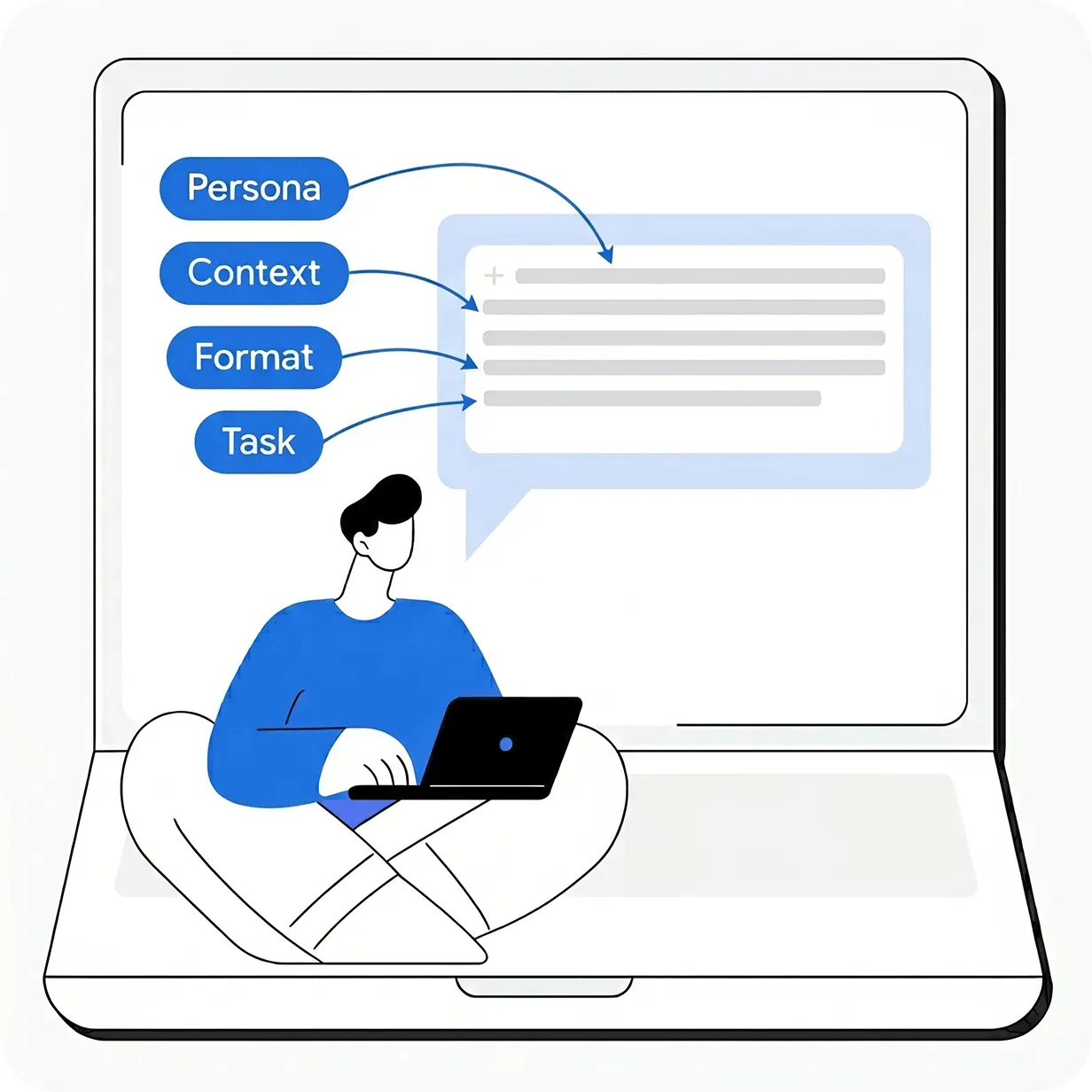
Effective prompting relies on using a clear framework — persona, task, format, and context — combined with an iterative process of refinement. By following the three C’s and treating AI outputs as a starting point, you can consistently guide the AI to deliver accurate and high-quality results.
Use new chats for new topics
A context window is the limit of how much information AI can retain and refer back to within a single chat. It allows AI to refer back to earlier parts of your conversation so its answers stay consistent. Because of this, you should always start a new chat when changing topics. This ensures AI only focuses on information that is relevant to your current task. If you switch to a completely new topic within the same chat, AI might use the unrelated context provided earlier, and generate an irrelevant or misguided response.
For example, if you were discussing messaging for a marketing campaign and now want to write a professional bio for your resume, start a new chat.
Save your best prompts in a library
Like any skill, your prompt writing abilities will improve through experimentation and practice. As you get more experience, you can save time by noting which prompts work best and reusing them.
- Create a personal prompt library: When a prompt gives you a great result, name it and save it for future use. Some AI tools even have this feature built-in.
- Don't reinvent the wheel: Once you have a successful prompt template, use it as your base. You can experiment by tweaking certain elements of the prompt like the task, persona, format, or context to get different results without starting from scratch.
- Example:
- Help me with a [task]. Use the expertise of [persona] when completing this task. The output should be [format]. Before you help me with this task, you should know that [context].
- Learn from your colleagues: Many people share successful prompts with their team. Sharing knowledge is a great way to find inspiration and learn new techniques.
This article is a curated excerpt from the Google AI Professional Certificate. This certificate is your path to AI fluency, built by Google experts. You’ll move beyond the basics with hands-on practice, gaining the in-demand skills and confidence to apply AI to your job from day one.
To get hands-on experience and master these skills, you can take the full certificate
here.